

Advanced: Setting up UTM_campaign or UTM_term Wayby campaign
Alongside A/B testing, one of the most important features in WayBy is the ability to use UTM tags to control and measure personalized landing page experiences.
UTMs allow you to:
- Trigger specific landing page variations
- Segment incoming traffic
- Measure marketing performance accurately
In Wayby, there are two UTM fields available:
- UTM Campaign
- UTM Term
Understanding how to use each correctly ensures clean reporting and reliable personalization.
Where to add UTM tags
You can add UTM parameters in two places:
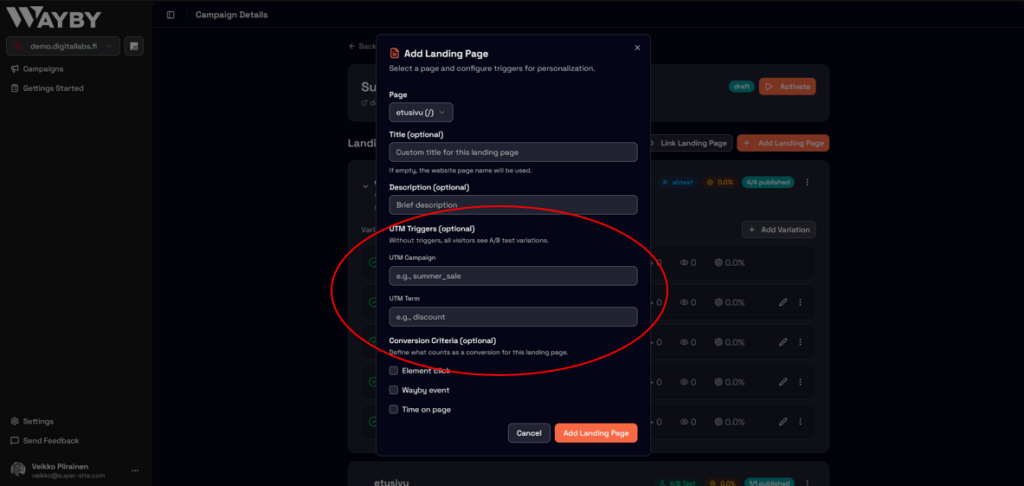
When creating a new landing page
During landing page setup, you’ll see fields for:
- UTM Campaign
- UTM Term
You can use either one, or both, depending on your targeting needs.
Editing an existing landing page
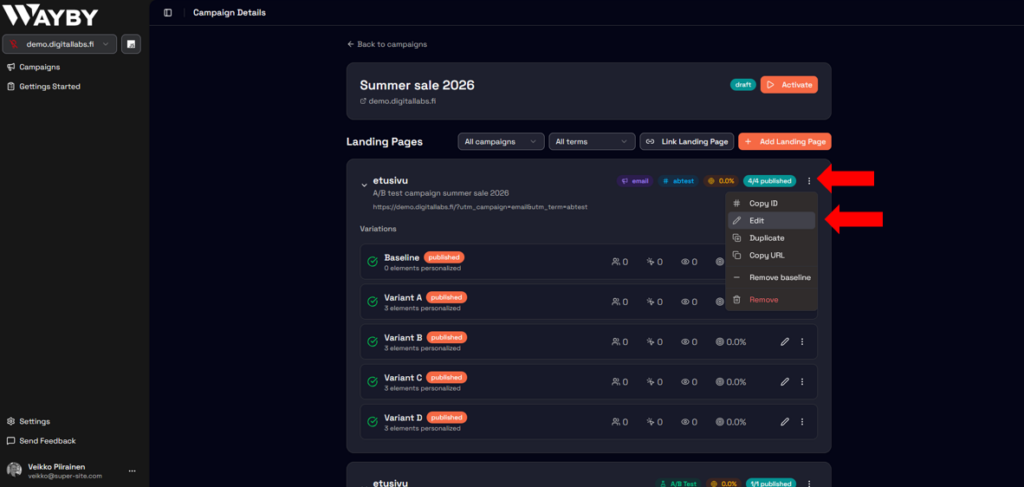
- Go to your Campaign
- Open the Landing Page
- Click the three dots in the upper-right corner
- Select Edit
- Add or modify:
- UTM Campaign
- UTM Term
- UTM Campaign
UTM campaign
What it is
UTM Campaign represents your marketing initiative.
It should answer:
What larger campaign is driving this traffic?
When to use it
Use UTM Campaign for:
- Product launches
- Seasonal promotions
- Webinars
- Events
- Major marketing initiatives
Example
If you are promoting a webinar:
utm_campaign=webinar
If you are running a seasonal sale:
utm_campaign=summer_sale_2026
Best practices for UTM campaign
- Use consistent naming across all channels
- Avoid spaces (use underscores instead)
- Keep names simple and stable
- Do not rename campaigns mid-flight
Good example:
summer_sale_2026
Common mistakes
- Using campaign field for ad variations
- Adding keywords into the campaign field
- Changing the campaign name while it is running
- Using inconsistent capitalization
UTM term
What it is
UTM Term captures the targeting detail behind the traffic.
It should answer:
Why did this specific audience see this ad?
When to use it
Use UTM Term for:
- Audience segments
- Targeting criteria
- Interest groups
- Keywords (if keyword-driven campaigns)
Example
Campaign: Webinar
Audience: Busy participants
utm_campaign=webinar
utm_term=busy_participants
Here:
- Campaign = marketing initiative
- Term = targeted audience
Best practices for UTM term
- Keep it focused on one targeting concept
- Use lowercase only
- Keep naming consistent across campaigns
- Avoid combining multiple targeting types in one field
Correct:
busy_participants
Common mistakes
- Using UTM Term as a dumping ground
- Mixing keywords and audience names in one value
Inconsistent capitalization (e.g., Busy_Participants vs busy_participants) - Adding multiple unrelated targeting details into one parameter
Example setup in Wayby
Let’s say you are running a webinar campaign targeting busy professionals.
Correct setup:
- UTM Campaign:
webinar - UTM Term:
busy_participants
What this achieves:
- Clean campaign-level reporting
- Clear audience segmentation
- Accurate performance tracking
- Reliable variation triggering
Why proper UTM structure matters
If UTM naming is inconsistent:
- Data becomes fragmented
- Reporting becomes unreliable
- Personalization logic may break
- Campaign comparisons become difficult
If UTM structure is clean:
- Performance data stays accurate
- A/B tests are easier to evaluate
- Campaigns scale without confusion
- Long-term optimization becomes reliable