

Advanced: Adding the default website as a benchmark for customized landing pages
One of the core capabilities of Wayby SaaS — and a critical principle in personalized marketing — is the ability to sanity check your results.
When running A/B tests or personalized variations, you need a reliable reference point. Without a baseline, performance metrics lack context. That’s where benchmarking against your original website content becomes essential.
Why benchmarking matters
When you create variations (A, B, C, D, etc.), you are modifying your original content in hopes of improving results — such as conversion rate, engagement, or other key metrics.
However, improvements can only be validated if you compare them against:
- The original version of the page
- The untouched starting point before any personalization
By adding your default website content as a baseline, you can clearly measure whether your variations:
- Increase conversions
- Decrease performance
- Or have no meaningful impact
This ensures your optimization efforts are data-driven rather than assumption-based.
What Is a baseline in Wayby SaaS?
A baseline represents the original website content before any variations were created.
For example:
- You created a campaign: Summer Sale 2026
- You pulled multiple variations (A, B, C, D) for A/B testing
- All of these variations were derived from the original front page
Adding a baseline means reintroducing that original front page as a comparison reference inside the campaign.
How to add a baseline
Follow these steps:
- Go to your Campaign
- Open the Landing Pages
- In the upper-right corner of the landing page, click the three-dot menu
- Select the option to Add Baseline
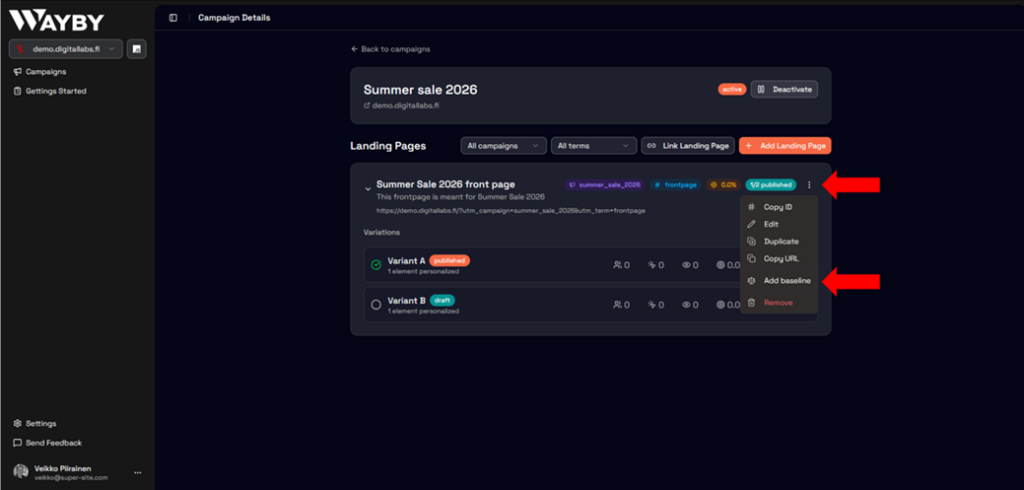
By clicking this, the system adds your original content as the benchmark for that landing page.
This process can be repeated for any landing page under the campaign.
What happens after adding the baseline?
Once the baseline is added:
- Your original content is now part of the performance comparison and variations cycle.
- All variations can be directly benchmarked against it
- You can clearly see whether variations outperform or underperform the original version
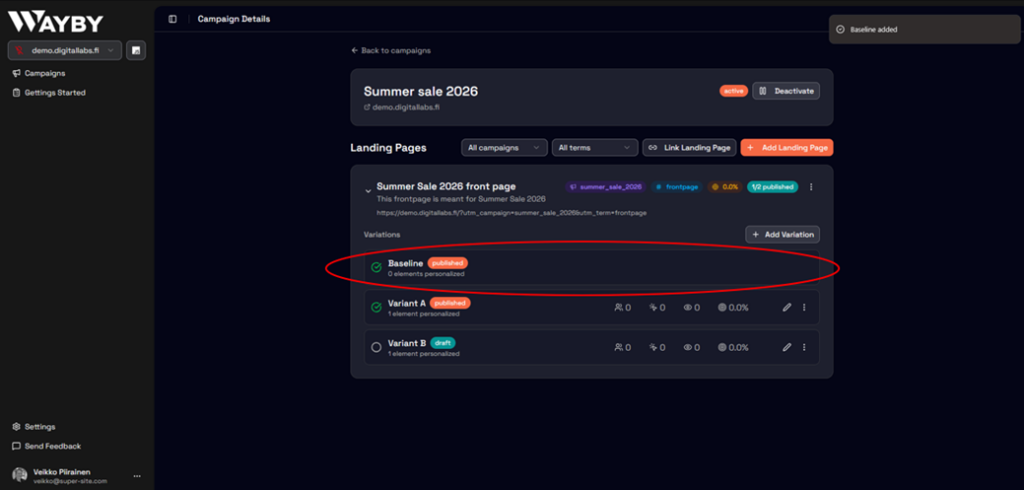
This allows you to:
- Validate the effectiveness of personalization
- Identify statistically meaningful improvements
- Avoid deploying changes that reduce performance
Best practice: Always benchmark
Whenever you run A/B tests or personalized campaigns, it is strongly recommended to:
- Add the baseline before drawing conclusions
- Compare conversion rates and other KPIs against the original version
- Make optimization decisions based on measurable impact
Personalization without benchmarking is guesswork.
Personalization with benchmarking is optimization.